
www.biospassword.tech logo

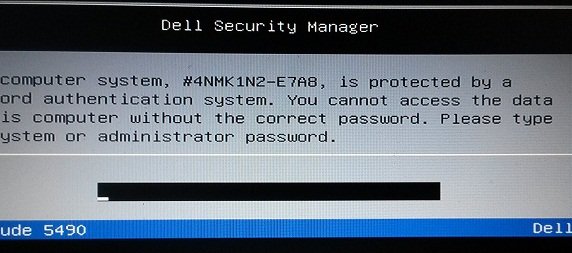
Dell G3 15-3590 Displaying: E7A8 Bios password Reset,
Unlock Laptop & Notebook

dell G3 15-3590 bios password reset


Find Here Dell G3 15-3590 BIOS Master Password, Get Help on how to unlock Dell Laptop & Notebook with E7A8,, there are up to 4 Bios master passwords just for these Dell laptop with E7A8 suffix.

Dear Customer:

If you have a Locked Dell G3 15-3590 Showing: E7A8, You can buy your password here, so enter your Dell Service Tag plus suffix E7A8 below and click on buy now.

Enter Service Tag + Suffix
Enter Dell laptop Model #

Your Dell G3 15-3590 password plus Bios password reset instruction will be sent by email within 5 minutes or the most it takes is 2 hours, password will work 100% or your money back.

Aditional Supported Models We can Reset:

Dell G3 15 3590, Inspiron 13 5378 2-in-1, Dell Inspiron 3581, Dell Inspiron 3583, Dell Inspiron 5482, Dell Inspiron 5591, Dell Inspiron 7391, Dell Inspiron 15 Gaming 7577, Dell Inspiron 7590, Dell Precision 3530, Dell Precision 5520, Dell Precision 5530, Dell Precision 5540, Dell Precision 7530, Dell Vostro 3580, Dell vostro 5468, Dell Wyse 5470, Dell Xps 13 7390, Dell XPS 13 9350, Dell XPS 13 9360, Dell Xps 13 9370, Dell XPS 15 9550, Dell Xps 15 7590, Dell Latitude 3301, Dell Latitude 3400, Dell Latitude 3490, Dell Latitude 3500, Dell Latitude 5285 2-In-1, Dell Latitude 5290, Dell Latitude 5400, Dell Latitude 5490, Dell Latitude 5491, Dell Latitude 5590, Dell Latitude E7270, Dell Latitude 7390, Dell Latitude 7480, Dell Latitude 7490, ETC, Not all models are listed here


Disclaimer:

Please Note: We like to think that you are unlocking your own laptop and that you know how many passwords are set, Know that Bios Password is used to unlock the motherboard, and hard drive password unlock only hard drives, Bios & HDD Passwords Are Sold Separately.

Resetting the Dell G3 15-3590 Bios Setup Password If You Have Access to the Master Password

If you already Bought the Bios Master Password from www.biospassword.tech, you can get into BIOS settings to change or remove the password easily.
1. Power on your computer, press (F2) key several times when Dell logo appears.
2. When get into BIOS settings, locate the ( Security) menu, find (Supervisor Password) or
(Administrator Password), press Enter.
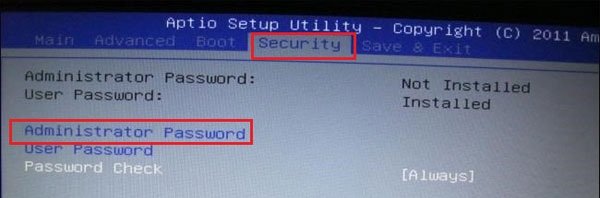
dell G3 15-3590 setup password

3. When the password text box pops up, enter the new password to reset it, or clear the password from text box to remove it.
4. Exit and save the change.
Tips 1: if the password fail or the laptop refuses to accept the password, Press and Hold down the left ( CTRL ) key, and the tap the ( Enter ) Twice.
Tips 2: Also there is a good chance the password failed because your keyboard is not QWERTY layout, or is not typing numbers properly, so use a USB External keyboard as last resource .

Keywords: Dell G3 15-3590 bios password, dell G3 e7a8 bios password, dell G3 15-3590 master password, dell G3 15-3590 hdd password, how to unlock dell G3 15-3590 laptop


For Dell Bios password reset, please visit our Bios password page

  • Dell Bios Password Reset